Free forever — 2 servers, full session search, zero limits on tools

Every RDP Session.
Every Server.
One Console.

AITRemote is a Windows console for IT admins who manage Terminal Servers: search live RDP sessions across every server at once, shadow or VNC into any of them, and keep an eye on server health — all from one window.

Free forever for 2 terminal servers. No credit card. Installs in minutes. Runs on your own network.

Download Free — Start in Minutes See How It Works 📄 Full Guide
Free — forever
Limited
$0 / always
Search live RDP sessions
Up to 2 Terminal Servers
1 RD Gateway broker IP
Active Directory user & computer search
Shadow Remote Control (mstsc)
Built-in VNC launch
Server Status dashboard
Maintenance / Drain mode control
Ping, Open C$, user profile & AD details
Single-instance protected
Send messages to users
Remote sign out / force logoff
Unlimited servers & broker IPs
Paid · $79/year
Unlimited
$79 / year
Search live RDP sessions
Unlimited Terminal Servers
Unlimited broker IPs
Active Directory user & computer search
Shadow Remote Control (mstsc)
Built-in VNC launch
Server Status dashboard
Maintenance / Drain mode control
Ping, Open C$, user profile & AD details
Send messages to users
Remote sign out / force logoff
All future updates included
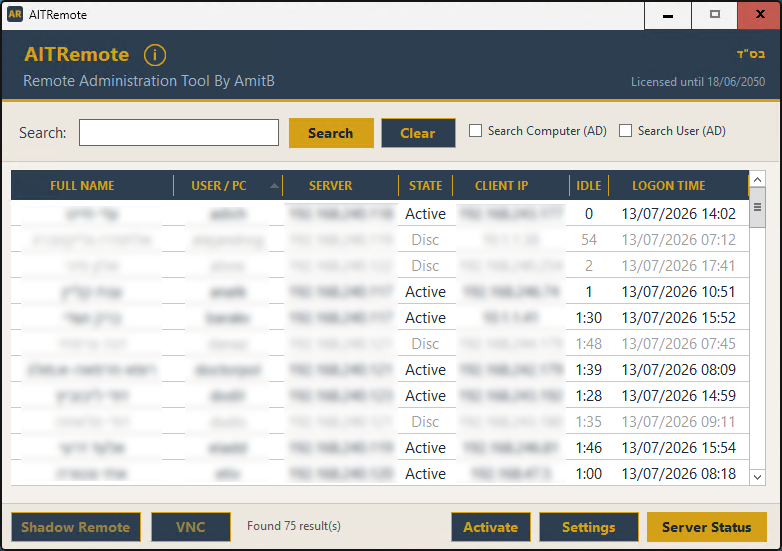
AITRemote main window — real screenshot

Stop Jumping Between Servers.

Instead of RDP'ing into each Terminal Server one by one to find a user, AITRemote polls every server you manage at once and gives you a single, searchable list — with the tools to act on it right there.

🔎
Live RDP Session Search
Search by username across every configured Terminal Server at once. Results stream in as each server responds, and a slow or offline server never blocks the rest.
🗂️
Active Directory Search
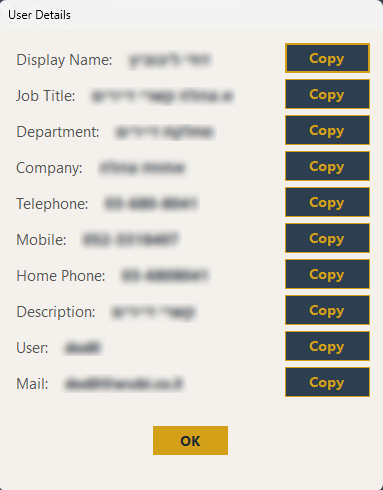
Search AD directly for users or computers by name, and pull full profile details — job title, department, phone numbers, email — with one click.
🌐
RD Gateway Broker Resolution
Configure your RD Gateway broker IPs and AITRemote cross-references gateway logs to resolve the user's real client IP, even through a broker.
🖥️
Shadow Remote Control
Double-click or right-click any active session to shadow it directly with mstsc — view and control the user's screen in real time.
🔌
Built-in VNC Launch
Jump straight into any workstation over VNC. Works with TightVNC out of the box, or point AITRemote at any other viewer you already use.
📊
Server Status Dashboard
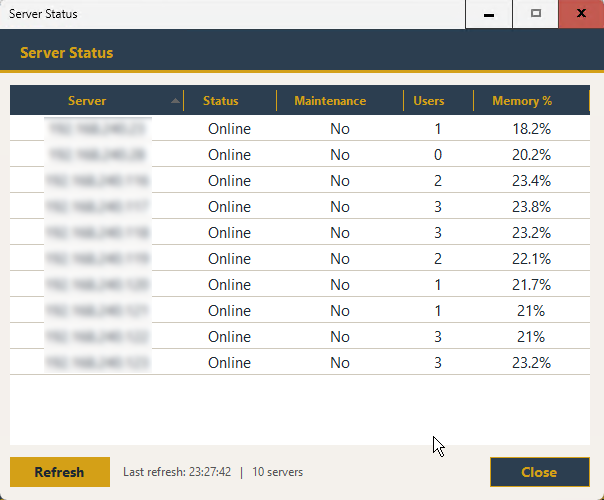
See every server's online state, maintenance mode, connected user count, and memory usage at a glance — refreshed with one click.
🚧
Maintenance / Drain Mode
Put a server into Soft Drain (reconnect only) or Full Drain (deny all new sessions) remotely before patching or rebooting — no console session needed.
✉️
Message Users Directly
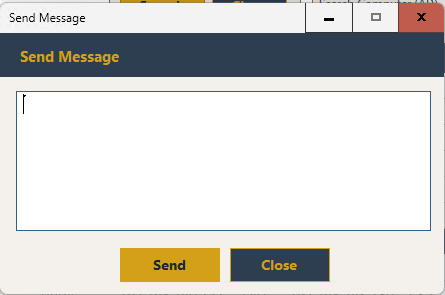
Send a message to one selected session, several at once, or broadcast to everyone on a server — useful for warning users before maintenance. (Unlimited plan)
🚪
Remote Sign Out
Force-log-off active or disconnected sessions remotely, with a confirmation prompt so nothing is closed by accident. (Unlimited plan)
🧰
Right-Click Admin Toolkit
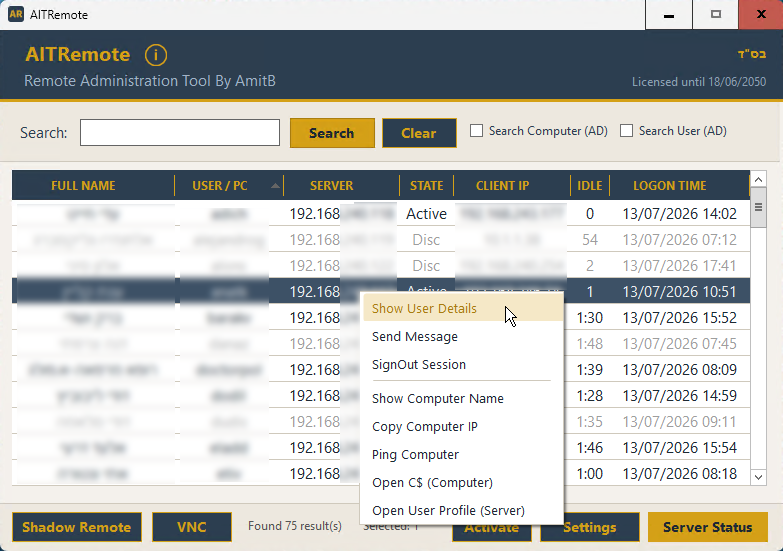
Ping a machine, open its C$ admin share, jump to a user's profile folder on the server, or copy the computer name — all one right-click away.
🆔
One-Click User Details
Pull a user's full AD card — name, title, department, company, phones, email — in a popup with a copy button next to every field.
🔒
Single-Instance Protected
Launch AITRemote again by accident and it simply brings your existing window to the front instead of opening a confusing second copy.

One down server never blocks you

Every server is queried on its own thread with a hard timeout. If a Terminal Server is offline, rebooting, or unreachable, AITRemote simply skips it and keeps loading results from everything else — no frozen search box, no waiting on the slowest machine in your estate.

Running in Minutes

A single Windows installer, no console session required, no configuration files to hand-edit.

01 / DOWNLOAD
Run the Installer
Download and run the AITRemote installer. A free Limited license is registered automatically on first launch — no form, no credit card.
02 / CONFIGURE
Add Servers & Brokers
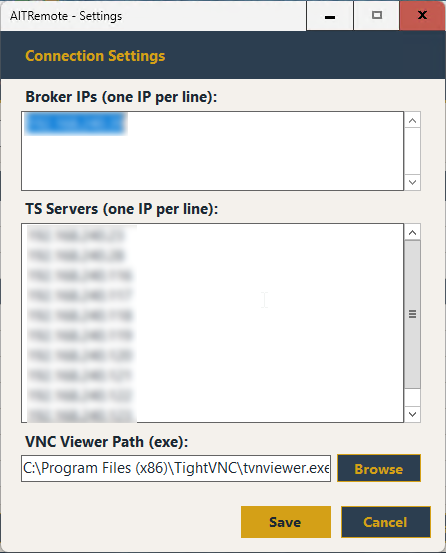
Open Settings and list your Terminal Servers and RD Gateway broker IPs, one per line. Optionally point AITRemote at your VNC viewer's .exe.
03 / SEARCH & ACT
Find a User, Take Action
Search by username, select a session, and shadow it, VNC into it, message the user, or sign them out — right from the results grid.
Main Window — search results

1. Search across every server — Type a username and results stream in from every configured Terminal Server at once.

Right-click context menu

2. Right-click any row — Shadow, message, sign out, ping, or open a share, all from one context menu.

Server Status dashboard

3. Server Status dashboard — Online state, maintenance mode, connected users, and memory usage for every server.

Settings dialog

4. Configure once — List your Terminal Servers, RD Gateway broker IPs, and VNC viewer path.

User Details popup

5. Full AD profile — Name, title, department, phones, and email, each with a one-click copy button.

Send Message dialog

6. Message users directly — Warn a session, a group, or an entire server before maintenance. (Unlimited plan)

Right-click any session or PC for the full toolkit

Every row in the results grid carries its own context menu, so the next action is never more than a right-click away.

Managing More Than 2 Servers?

The free plan is a fully working console for up to 2 Terminal Servers and 1 broker IP — every search and admin tool included, no expiry. When your estate grows, or you need to message and sign out users remotely, one license unlocks everything.

What the paid license unlocks

Unlimited Terminal Servers & broker IPs — the free plan is capped at 2 servers and 1 broker
Send messages to users — to one session, several, or an entire server
Remote sign out — force-log-off active or disconnected sessions
All future updates included
🔓 Nothing is ever held hostage If your license lapses, AITRemote simply falls back to the Limited plan — your configured servers and brokers stay saved, and the moment you reactivate, everything above your first 2 servers and 1 broker comes back automatically. Nothing is deleted.
📋 Before purchasing AITRemote is a self-service admin tool, sold as-is, licensed per machine (bound to the hardware ID of the PC running it). Use the free plan to confirm it fits your environment, then upgrade when you need more servers or the messaging/sign-out tools.
AITRemote Unlimited
$79
per year · 1 machine running AITRemote
Upgrade — $79/year 3 Licenses — $189/year

Enter your license key directly in the app after purchase — no reinstall needed.

Start Free. Upgrade When Your Estate Grows.

Download AITRemote, point it at your Terminal Servers, and you're searching live sessions in minutes. Free forever for 2 terminal servers — no expiry, no credit card.

Download Free — Take Control of Your Servers

// Windows only  ·  Windows Installer  ·  Free forever for 2 terminal servers  ·  $79/year for unlimited servers