Free forever — 1 list, full encryption, zero limits on access

Your Passwords.
Encrypted Locally.
Never Locked Away.

AITPass is a Windows password vault with military-grade AES-256 encryption, smart multi-user locking, and image attachments — running entirely on your own machine.

Free forever, works fully offline. No credit card. No cloud. No expiry. Windows Installer.

Download Free — Start in 3 Minutes See How It Works 📄 Full Guide
Free — forever
Limited
$0 / always
Full AES-256 encryption
Unlimited entries in 1 list
View all additional lists — always
Image attachments (paste or upload)
Undo / redo
Idle auto-lock
Multi-user safe view-only locking
Change master password anytime
Works 100% offline — no server contact
Clickable links in notes
Recent DBs — switch with one click
Add / edit more than 1 list
Drag-to-reorder lists
Automatic scheduled backups
Paid · $15/year
Unlimited
$15 / year
Full AES-256 encryption
Unlimited lists (categories)
Add, edit & delete every list
Image attachments (paste or upload)
Undo / redo
Idle auto-lock
Multi-user safe view-only locking
Change master password anytime
Clickable links in notes
Recent DBs — switch with one click
Drag-to-reorder lists
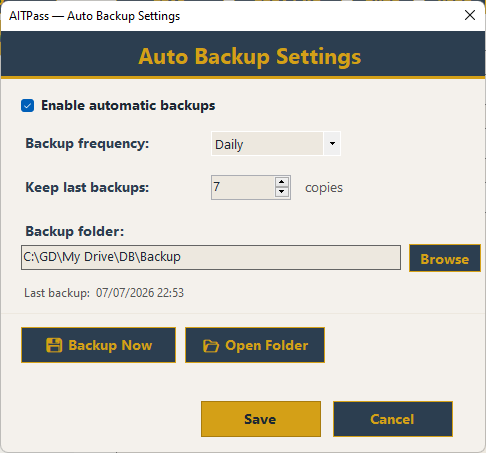
Automatic scheduled backups
Daily / weekly / monthly, auto-pruned
All future updates included
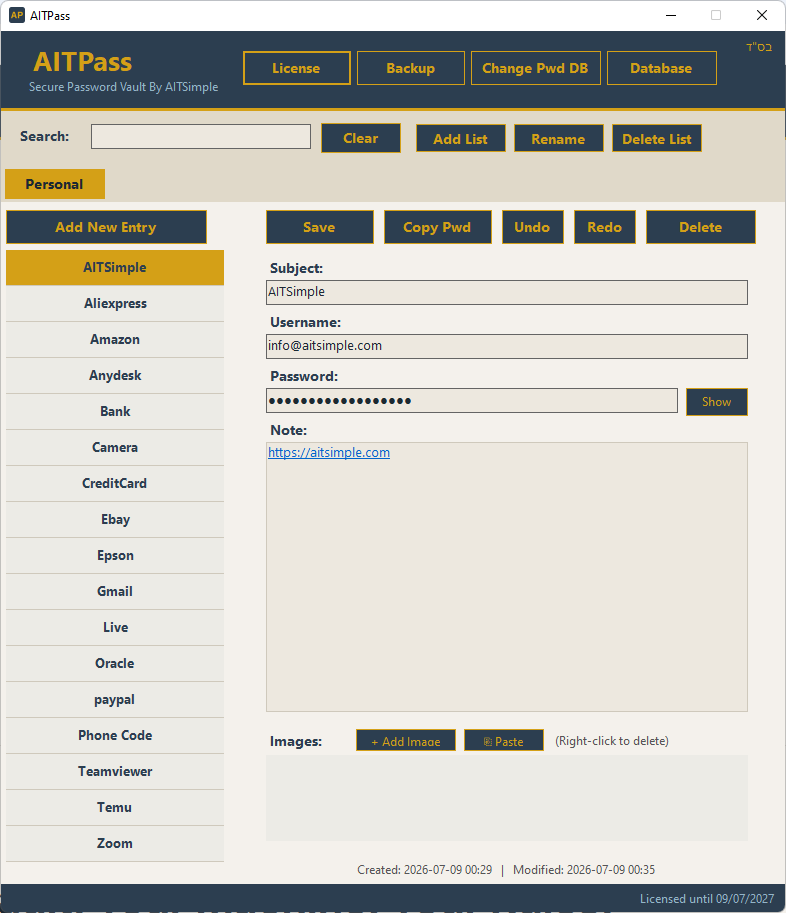
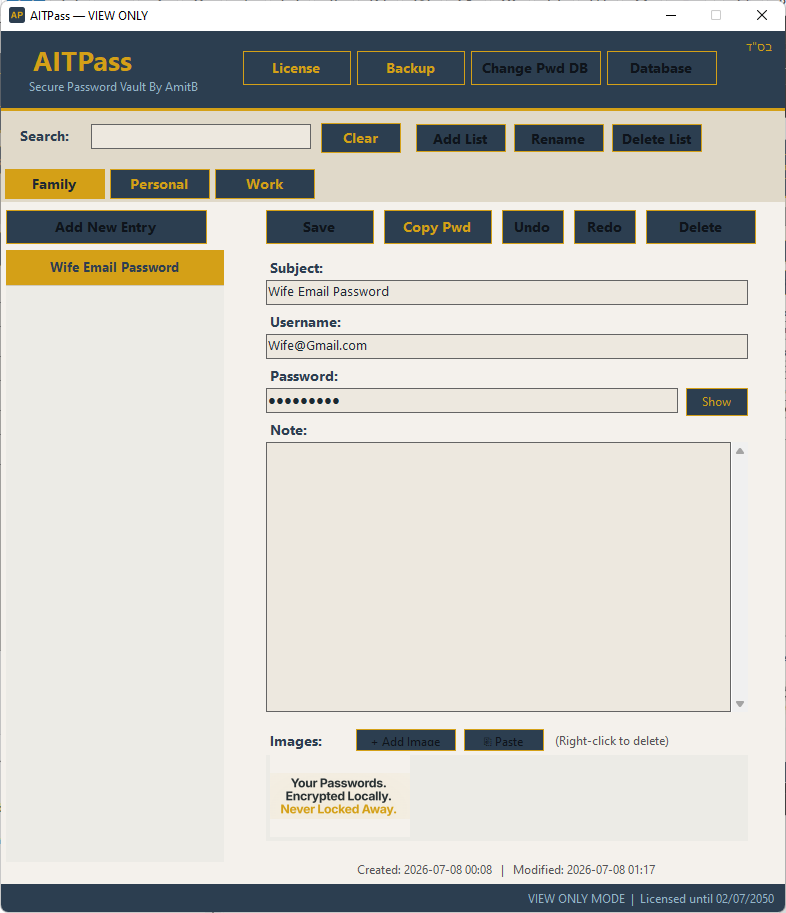
AITPass main window — real screenshot

Your Vault. Your Machine. Your Rules.

No cloud sync, no third-party servers holding your secrets. Everything is encrypted locally with a key derived from your own master password — AITPass never sees your data, ever.

🔐
AES-256-CBC Encryption
Every database is encrypted with AES-256, keyed by PBKDF2-SHA256 at 600,000 iterations — a randomly generated salt is embedded in the file itself.
🗂️
Categories & Lists
Organize entries into named lists — Personal, Work, Banking, Servers, anything you like. Rename or delete lists whenever you need.
🖼️
Image Attachments
Paste a screenshot straight from your clipboard or attach a file to any entry — perfect for license certificates, QR codes, or ID scans.
↩️
Full Undo / Redo
Every change — edits, deletions, list renames — can be undone or redone, so a mistake never costs you data.
🤝
Smart Multi-User Locking
Open the same database from two computers and the second one automatically becomes view-only — then switches back to edit mode the instant the first one closes.
⏱️
Idle Auto-Lock
AITPass locks itself and asks for your master password again after 10 minutes of inactivity — so a locked screen doesn't mean an open vault.
💾
Scheduled Backups
Automatic daily, weekly, or monthly backups to a folder of your choice, with old copies pruned automatically. (Unlimited plan)
🔑
Change Master Password
Rotate your master password at any time — AITPass re-encrypts the entire database with a freshly generated salt.
📴
Fully Offline Capable
The free plan needs no internet connection at all. Even the Unlimited plan keeps working through a 7-day offline grace period.
🔗
Clickable Links in Notes
Paste a URL into any entry's Note field and AITPass automatically turns it into a clickable link — one click opens it in your default browser.
🔀
Drag-to-Reorder Lists
Grab any list tab and drop it onto another to change the order your lists appear in. (Unlimited plan)
🕘
Recent Databases
Switch between multiple vault files with one click — AITPass remembers your last 8 databases and lets you jump straight back in.
🤝

Two computers, one database, zero conflicts

AITPass uses an OS-level file lock, not a timestamp guess. The moment a second computer opens the same database, it's automatically shown in read-only mode with a clear banner — no risk of two people overwriting each other's changes. As soon as the first session closes the file, the waiting session is upgraded back to full edit mode automatically, with no restart needed.

Running in 3 Minutes

A small, quick Windows installer. No configuration files, no account to create.

01 / DOWNLOAD
Run the Installer
Download and run the AITPass installer. A free license is registered automatically on first launch — no form, no credit card.
02 / SET A MASTER PASSWORD
Create Your Vault
Choose where the encrypted database file lives, and set a master password (minimum 8 characters). That's your only key — write it down somewhere safe.
03 / START ADDING ENTRIES
Fill Your Vault & Relax
Add logins, notes, and image attachments. AITPass auto-locks after 10 minutes idle, so you're always protected.
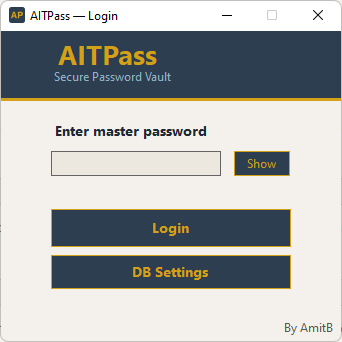
Login / Create Master Password

1. Create your master password — The only password you'll ever need to remember. Minimum 8 characters.

Main Vault

2. Organize into lists — Category tabs across the top, entries on the left, full detail on the right.

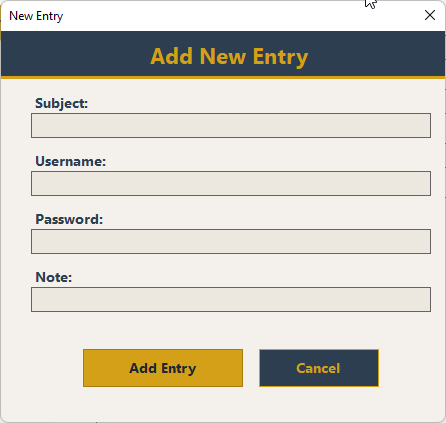
Add New Entry

3. Add an entry — Subject, username, password, and a free-text note, encrypted the instant you save.

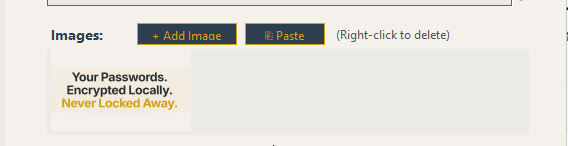
Image Attachments

4. Attach images — Paste directly from the clipboard (Ctrl+V) or upload a file to any entry.

Concurrent Access View Only

5. Safe on two machines — Open the vault elsewhere and it automatically switches to view-only, with a clear on-screen notice.

Backup Settings

6. Schedule backups — Daily, weekly, or monthly copies to any folder, with old backups pruned automatically.

Need More Than One List?

The free plan is a fully working, fully encrypted vault with no expiry and no nag screens. When you want to organize entries into more than one list, one license unlocks everything.

What the paid license unlocks

Unlimited lists (categories) — the free plan is limited to 1 editable list
Automatic scheduled backups — daily, weekly, or monthly
All future updates included
🔓 Your data is never locked away Even on the Free plan, you can always view every list you've ever created and every entry inside it — nothing is ever hidden, deleted, or held hostage. The only limit on Free is editing: you can add, change, and delete entries in your first list, while additional lists stay visible in read-only mode until you upgrade.
📋 Before purchasing AITPass is a self-service tool, sold as-is. Your master password is the only key to your data — AITPass has no password recovery mechanism, by design. Use the free plan to confirm AITPass fits your workflow, then upgrade when you need more lists or automatic backups.
AITPass Unlimited
$15
per year · 1 machine running AITPass
Upgrade — $15/year 3 Licenses — $36/year

Enter your license key directly in the app after purchase — no reinstall needed.

Start Free. Upgrade When You Need To.

Download AITPass, set a master password, and your vault is ready in under three minutes. Free forever for 1 list — no expiry, no credit card, nothing ever locked away.

Download Free — Secure Your Passwords Now

// Windows only  ·  Windows Installer  ·  Free forever for 1 list  ·  $15/year for unlimited lists